Papan Arduino NANO 33 BLE Sense dirancang untuk solusi hemat daya dan hemat biaya bagi pembuat piranti elektronika yang memiliki konektivitas Bluetooth Hemat Energi. Menggunakan modul NINA B306, terdiri dari chip mikrokontroler Cortex M4F besutan Nordik, yaitu nRF52480. Arduino NANO 33 BLE Sense sama dengan Arduino NANO 33 BLE namun dengan tambahan satu set sensor yang sangat populer untuk mempelajari Machine Learning sebagai bagian dari kecerdasan buatan atau Artificial Inteligence (AI).
Untuk menggunakan modul ini, perlu menambahkan pustaka (library) Arduino nRF528x mbed Core. Caranya dengan memilih menu Tools, kemudian Boards dan Boards Manager, seperti yang didokumentasikan di halaman Arduino Boards Manager.
Arduino NANO 33 BLE Sense adalah variasi perangkat keras dari Arduino NANO 33 BLE; kedua modul tersebut dikenali sebagai Arduino NANO 33 BLE dan ini normal.
menginstal Driver untuk Arduino NANO 33 BLE Sense.
Dengan nRF528x mbed core diinstal, saatnya melanjutkan dengan penginstalan driver.
Pada Windows, jika menginstal Core nRF528x mbed dengan benar, cukup hubungkan Arduino NANO 33 BLE Sense ke komputer dengan kabel USB. Windows akan memulai proses instalasi drivernya setelah papan dicolokkan.
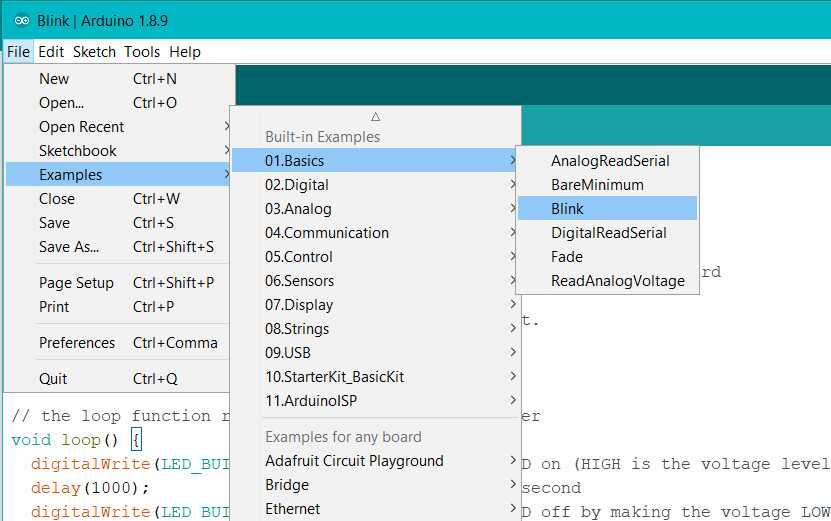
Memulai contoh sketch: blink
Pilih jenis board yang benar
Pilih Port yang sesuai
Mikrokontroler pada Arduino NANO 33 BLE Sense berjalan pada 3.3V, yang berarti tidak boleh menggunakan lebih dari 3.3V ke pin Digital dan Analognya. Berhati-hatilah saat menghubungkan sensor dan aktuator untuk memastikan bahwa batas 3,3V ini tidak pernah terlampaui. Menghubungkan sinyal tegangan yang lebih tinggi, seperti 5V yang biasa digunakan dengan papan Arduino lainnya, akan merusak Sense Arduino NANO 33 BLE.
Tegangan kerja 5V sekarang hanya menjadi pilihan tambahan untuk berbagai modul, sedangkan tegangan 3,3V menjadi tegangan standar untuk IC elektronik.
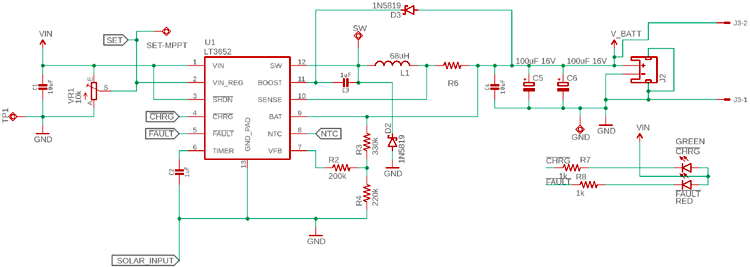
Here is a practical example of shunt resistor selection for an MPPT based solar charge controller circuit. The below circuit uses LT3652, an MPPT charge controller from Linear Technology (Analog devices). However, If we look carefully, the battery that will be charged through this circuit is the load.
The load is connected using a shunt resistor R6. The R6 will determine the charge current, which means the voltage drop of this R6 will remain constant in every case as V = I x R. The R will be constant, the V will be constant, the driver will change the charge current.
To select the shunt resistor, the following things will be required-
The constant voltage that will be used by the driver IC LT3652
The maximum charge current that is required to be delivered to the battery through the resistor.
Since it is a charge controller tolerance could be 1%.
As per the LT3652 datasheet, the sense pin will use 100 mV (0.1V) sense voltage that will be constant. Also, the maximum charge current LT3652 supports is 2A. Thus, the Shunt Resistor value needs to be R = V / I or Shunt resistor value will be 0.1V / 2A = 0.05 Ohms or 50 mili-ohms.
The power rating of this resistor needs to be P = I2R or P = 22 x 0.05 = 0.2 Watt. The close value of the shunt resistor will be 50 mili-ohms, 1% rated, 0.25 Watt. But instead of 0.25 Watt, 0.375 Watt is the safe resistor wattage that can be used.
An issue is that you have to make decisions about how fast a track is moving under pure signals from a single pot and what to do when signals from the other pot are included. For example, if you push the FB (Forward-Backward pot fully forwards, and if both motors then run at full speed ahead, how do you deal with the addition of a small amount of LR (Left-Right) pot being added. To get rotation you have to have one track going faster that the other. So, if you are already running at maximum forwards speed on both motors you must decrease one or other track speed in order to turn. But, if you had been standing still you would have accelerated one or other track to achieve the same result.
So, all that said, here is a simple off-the-cuff starting solution out of my head which seems like good start.
If pots are mechanically independant then both can be at 100% simultaneously. If both are on a joystick type arrangement, if Yaxis = 100% and Xaxis = 0%, then adding some B will usually reduce A. A joystick could be constructed where the above is not true, but these are unusual. Assume that the joystick is of the type that increasing Y% when X = 100% will reduce X. Other assumptions can be made.
FB = front-back pot. Centre zero, +Ve for forward motion of pot
LR = Left right pot. Centre zero. +Ve for pot at right.
K is a scale factor initially 1. If any result exceeds 100% then adjust K so result = 100% and use same K value for other motor also.
eg if Left motor result = 125 and Right motor result = 80 then. As 125 x 0.8 = 100, set K = 0.8. Then. Left = 125 x 0.8 = 100%. Right = 80 x 0.8 = 64%.
Then:
Left motor = K x (Front_Back + Left_Right)
Right motor = K x (Front_Back – Left_Right)
Sanity checks:
LR = 0 (centered), FB = full fwd -> Both motors run full forwards.
LR = full left, FB = 0 -> Left motor runs full backwards, Right motor runs full forwards. Vehicle rotates anti clockwise.
FB was 100%, Lr = 0%. Add 10% of LR to right. L = FB+LR = 100%- + 10% R = FB-LR = 100%- – 10%
If largest axis < 100%, scale until = 100%. Then scale other axis by same amount.
Looking at highly price Camera SDK to handle ONVIF Standard, I decided to build some code to control PTZ camera movement using C#.
It it a nice tutorial video by Onvif Channel. That video describes basic step to make a C# project on visual studio. Unfortunately, I can’t get it work for my camera. I’m having YooSee camera GW-1113 which is already support PTZ Control.
There is another tutorial in CodeProject to use PTZ Control. My code is always get a closed connection message from the camera. Both using password or nor, it alway failed. Next, I got nice tool to cek my Onvif Camera. It can detect camera’s IP, port, display video stream and controlling camera using PTZ. You can get it here https://sourceforge.net/projects/onvifdm/ Afterward, I got IP, Port, and service.
With correct IP, Password, port and service address, it still error on getProfiles() command. I inisiate to find tool to debug Onvif request. I grab this tool in this forum https://support.yooseecamera.com/threads/233/ Nice step by step tutorial with pictures. I made my dummy service and dump post header request and then save it into textfile. Here is PHP code i got from // https://gist.github.com/magnetikonline/650e30e485c0f91f2f40 to dump request. I save it on http://localhost:5000/onvif/device_service/index.php
<?php

class DumpHTTPRequestToFile {

	public function execute($targetFile) {

		$data = sprintf(
			"%s %s %s\n\nHTTP headers:\n",
			$_SERVER['REQUEST_METHOD'],
			$_SERVER['REQUEST_URI'],
			$_SERVER['SERVER_PROTOCOL']
		);

		foreach ($this->getHeaderList() as $name => $value) {
			$data .= $name . ': ' . $value . "\n";
		}

		$data .= "\nRequest body:\n";

		file_put_contents(
			$targetFile,
			$data . file_get_contents('php://input') . "\n"
		);

		echo("Done!\n\n");
	}

	private function getHeaderList() {

		$headerList = [];
		foreach ($_SERVER as $name => $value) {
			if (preg_match('/^HTTP_/',$name)) {
				// convert HTTP_HEADER_NAME to Header-Name
				$name = strtr(substr($name,5),'_',' ');
				$name = ucwords(strtolower($name));
				$name = strtr($name,' ','-');

				// add to list
				$headerList[$name] = $value;
			}
		}

		return $headerList;
	}
}


(new DumpHTTPRequestToFile)->execute('./dumprequest.txt');
exit();
And here are resutl I got from C# and Device Test Tool
Above was C# request, while next into it was Tool request You can see that the difference is only at HTTP headers section. Thus, I have to remove Expect:100-continue , gzip compression and Keep-Alive Connection (oprional). As well as add an Accept type.
            try
            {
                var messageElement = new TextMessageEncodingBindingElement()
                {
                    MessageVersion = MessageVersion.CreateVersion(
                      EnvelopeVersion.Soap12, AddressingVersion.None)
                };

                HttpTransportBindingElement httpBinding = new HttpTransportBindingElement()
                {
                    AuthenticationScheme = AuthenticationSchemes.Digest

                };
                //remove compression
                httpBinding.DecompressionEnabled = false;
                // remove keep alive
                httpBinding.KeepAliveEnabled = false;


                CustomBinding bind = new CustomBinding(messageElement, httpBinding);
                // Remove Expect
                ServicePoint servicePoint =
                    ServicePointManager.FindServicePoint(service_uri);
                servicePoint.Expect100Continue = false;

                if (searchServiceUri)
                {
                    // now execute some service operation
                    Device.DeviceClient device = new Device.DeviceClient(bind,
                      new EndpointAddress(service_uri));
                    device.ClientCredentials.HttpDigest.AllowedImpersonationLevel =
                      System.Security.Principal.TokenImpersonationLevel.Impersonation;
                    device.ClientCredentials.HttpDigest.ClientCredential.UserName = userName;
                    device.ClientCredentials.HttpDigest.ClientCredential.Password = password;

                    Device.Capabilities cap = device.GetCapabilities(null);

                }
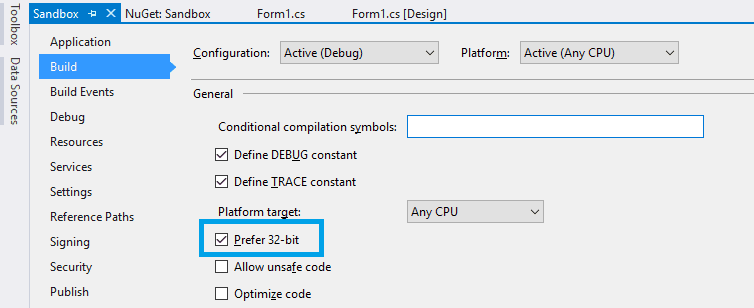
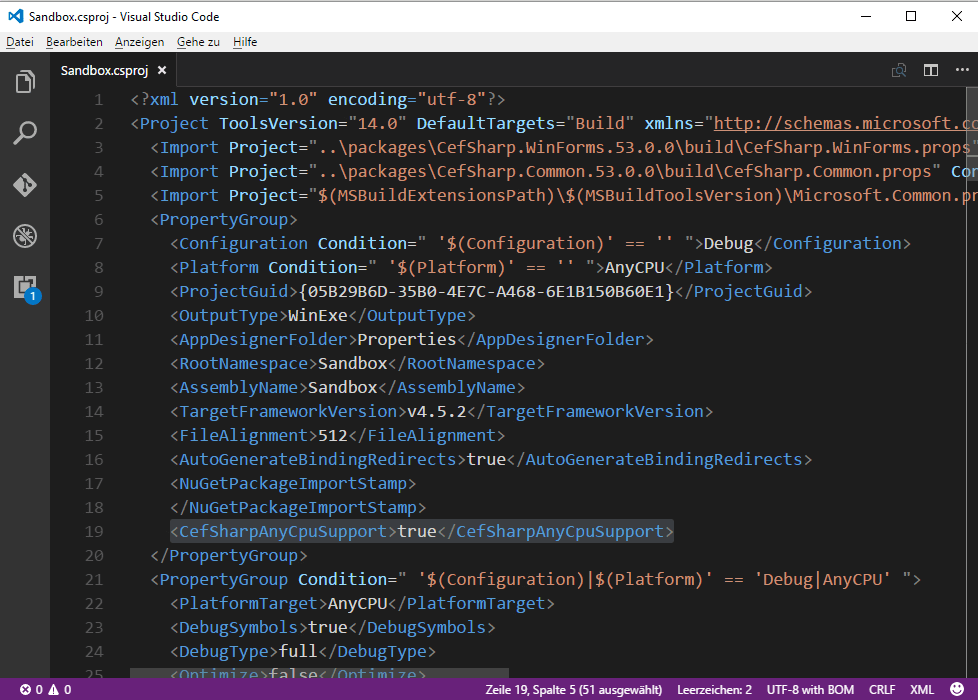
Ganti Target Net 4.5.2 keatas dan platform configuration (x86, x64 or AnyCPU)
Jika menggunakan AnyCPU, bagian Project > Your Project Properties > Build centang bagian Prefer-32bit. Jika menggunakan x64, buatlah Configurasi untuk x64 (Silahkan googling)
jika menemukan: Please check to make sure that you have specified a valid combination of Configuration and Platform for this project. Maka buka
Klik kanan Project > Properties > Build lalu cut pada bagian Output Path. Selanjutnya Build project lalu paste lagi di tempat semula. Selanjutnya silahkan coba rebuild lagi.
program.cs
using System;
using System.Collections.Generic;
using System.Linq;
using System.Threading.Tasks;
using System.Windows.Forms;

using CefSharp;
using CefSharp.WinForms;
using System.IO;

namespace WindowsFormsApplication1
{
    static class Program
    {
        /// <summary>
        /// The main entry point for the application.
        /// </summary>
        [STAThread]
        static void Main()
        {
            Cef.EnableHighDPISupport();

            var settings = new CefSettings()
            {
                //By default CefSharp will use an in-memory cache, you need to specify a Cache Folder to persist data
                CachePath = Path.Combine(Environment.GetFolderPath(Environment.SpecialFolder.LocalApplicationData), "CefSharp\\Cache")
            };
            //Example of setting a command line argument
            //Enables WebRTC
            settings.CefCommandLineArgs.Add("enable-media-stream");

            //Perform dependency check to make sure all relevant resources are in our output directory.
            Cef.Initialize(settings, performDependencyCheck: true, browserProcessHandler: null);

            Application.EnableVisualStyles();
            Application.SetCompatibleTextRenderingDefault(false);
            Application.Run(new Form1());
        }
    }
}
Form1.cs
using System;
using System.Collections.Generic;
using System.ComponentModel;
using System.Data;
using System.Drawing;
using System.Linq;
using System.Text;
using System.Threading.Tasks;
using System.Windows.Forms;

using CefSharp;
using CefSharp.WinForms;

namespace WindowsFormsApplication1
{
    public partial class Form1 : Form
    {
        public ChromiumWebBrowser chromeBrowser;

        public Form1()
        {
            InitializeComponent();
            InitializeChromium();
        }

        public void InitializeChromium()
        {
            // Create a browser component
            //chromeBrowser = new ChromiumWebBrowser("http://admin:@192.168.43.10/video.cgi");
            chromeBrowser = new ChromiumWebBrowser("http://localhost:8001/camera/mjpeg");
            // Add it to the form and fill it to the form window.
            panel1.Controls.Add(chromeBrowser);
            chromeBrowser.Dock = DockStyle.Fill;

            //Wait for the page to finish loading (all resources will have been loaded, rendering is likely still happening)
            chromeBrowser.LoadingStateChanged += (sender, args) =>
            {
                //Wait for the Page to finish loading
                Console.WriteLine("Loading State Changed GoBack {0} GoForward {1} CanReload {2} IsLoading {3}", args.CanGoBack, args.CanGoForward, args.CanReload, args.IsLoading);
                if (args.CanReload && !args.IsLoading)
                {
                    //chromeBrowser.Reload();
                }
            };

            chromeBrowser.IsBrowserInitializedChanged += OnIsBrowserInitializedChanged;

            //Wait for the MainFrame to finish loading
            chromeBrowser.FrameLoadEnd += (sender, args) =>
            {
                //Wait for the MainFrame to finish loading
//                if (args.Frame.IsMain)
                {
                    Console.WriteLine("MainFrame finished loading Status code {0}", args.HttpStatusCode);
                    if (args.HttpStatusCode == 200)
                    {
                        //finished, OK, streaming end
                        chromeBrowser.Reload();
                    }
                    if (args.HttpStatusCode == -101)
                    {
                        //finished, OK, streaming shut down
                        chromeBrowser.Reload();
                    }
                    if (args.HttpStatusCode == 0)
                    {
                        //The client request wasn't successful.
                        chromeBrowser.Reload();
                    }
                }
            };

        }

        private void ChromeBrowser_FrameLoadEnd(object sender, FrameLoadEndEventArgs e)
        {
            Console.WriteLine("end");
        }

        private void OnLoadingStateChanged(object sender, LoadingStateChangedEventArgs e)
        {
            Console.WriteLine(chromeBrowser.IsLoading);
        }

        private void OnIsBrowserInitializedChanged(object sender, EventArgs e)
        {
            var b = ((ChromiumWebBrowser)sender);

            this.InvokeOnUiThreadIfRequired(() => b.Focus());
        }

        private void button1_Click(object sender, EventArgs e)
        {
            string url = textBox1.Text;
            if (Uri.IsWellFormedUriString(url, UriKind.RelativeOrAbsolute))
            {
                chromeBrowser.Load(url);
            }
        }
    }


    public static class ControlExtensions
    {
        /// <summary>
        /// Executes the Action asynchronously on the UI thread, does not block execution on the calling thread.
        /// </summary>
        /// <param name="control">the control for which the update is required</param>
        /// <param name="action">action to be performed on the control</param>
        public static void InvokeOnUiThreadIfRequired(this Control control, Action action)
        {
            //If you are planning on using a similar function in your own code then please be sure to
            //have a quick read over https://stackoverflow.com/questions/1874728/avoid-calling-invoke-when-the-control-is-disposed
            //No action
            if (control.Disposing || control.IsDisposed || !control.IsHandleCreated)
            {
                return;
            }

            if (control.InvokeRequired)
            {
                control.BeginInvoke(action);
            }
            else
            {
                action.Invoke();
            }
        }
    }
}
<?php
$tmpdir = sys_get_temp_dir();   # ambil direktori temporary untuk simpan file.
$file =  tempnam($tmpdir, 'ctk');  # nama file temporary yang akan dicetak (Windows, samba)

$handle = fopen($file, 'w');


//Printer parameter (ESC POS Command)
$initialized = chr(27).chr(64);

$justify = Chr(27) . Chr(97);
$left = Chr(0); $center = Chr(1);$right = Chr(2);

$fontwidth = Chr(27).Chr(87);
$doublewidth = Chr(1); $normalwidth = Chr(0);

$LF = Chr(10);

//Start making data
$Data  = $initialized;
$Data .= $fontwidth.$doublewidth;
$Data .= $justify.$center;
$Data .= "NAMA TOKO"."\n";
$Data .= $fontwidth.$normalwidth;
$Data .= "Alamat Toko"."\n";
$Data .= $LF.$LF;

//Write data to temporary file
fwrite($handle, $Data);
fclose($handle);

//WIN: send temporary file to nerwork shared printer (share your printer)
//LINUX: send data directly to device
if (strtoupper(substr(PHP_OS, 0, 3)) === 'WIN'){ //Win
    copy($file, "//localhost/POS-58");  # Shared Printer as POS-58
}else if (strtoupper(substr(PHP_OS, 0, 3)) === 'LIN'){ //Linux
    $device = "/dev/usb/lp0";           # Print at lp0, find it using lsusb! Use udev for managing user access
    if (is_writable($device)) {
        $fp =fopen($device, "w");
        if($fp) {
            fwrite($fp, $Data);
            fclose($fp);
        }
    }
}

unlink($file);
//echo $Data;

?>
Cara mencetak ke printer POS menggunakan PHP. Skrip ini mencontohkan jika menggunakan Windows maupun Linux.
Untuk menggunakan Windows maupun Linux, printer dibuat menjadi akses bersama (shared printer) terlebih dahulu lalu beri nama, misalnya: POS-58. Pastikan bisa diakses di //ALAMAT_IP/NAMA_PRINTER. Untuk skrip ini, menggunakan //localhost/POS-58 Untuk di Windows, buka di Control Panel, pastikan printer yang di-share sudah tersedia dan online.
Sedangkan jika menggunakan Linux, cari nama device dengan perintah:
ls /dev/usb
alamat device printer akan diawali dengan lpx, dimana x bisa 0,1,2 atau angka yang lain. Bagaimana bisa memastikan mana alamat device yang benar? gunakan perintah berikut:
echo "Test Printer" >> /dev/usb/lp0
Jika printer bisa mencetak, berarti alamat printer adalah benar, yaitu /dev/usb/lp0 jika salah ganti angka 0 dengan angka 1 atau 2 atau angka lain hingga printer bisa mencetak. Pada skrip ini, alamat device perinter adalah /dev/usb/lp0