G21        ;metric values
G90        ;absolute positioning
M82
M107       ;start with the fan off
G28 ;Home
G1 Z15.0 F2000 ;Move the platform
G92 E0
G1 E10 F100   ; Extrude filament sejauh 20 mm
G92 E0
G1 F{travel_speed}
;Put printing message on LCD screen
M117 NowPrinting...
;End GCode
M104 S0                     ;extruder heater off
M140 S0                     ;heated bed heater off (if you have it)
G91                                    ;relative positioning
G1 E-1 F300                            ;retract the filament a bit before lifting the nozzle, to release some of the pressure
G1 Z+0.5 E-5 X-20 Y-20 F{travel_speed} ;move Z up a bit and retract filament even more
G28 X0 Y0                              ;move X/Y to min endstops, so the head is out of the way
M84                         ;steppers off
G90                         ;absolute positioning
Berikut profil filament untuk Cura. Ganti ekstensi pdf menjadi zip lalu ekstrak. File profil berektensi .curaprofile
Jika terjadi stringing maka pastikan filamen kering, ekstruder bersih dan pendingin filamen pada ekstruder bekerja maksimal. Kalibrasi suhu dengan temperature tower dan kalibrasi retraction. Aktifkan Combing, percepat travel speed, aktifkan coasting dan aktifkan wiping jika perlu.
Jika tidak mau menempel, gunakan PTE atau ABS+Acetone untuk membuat pasta. pastikan jarak nozle dengan bed rata 1 kertas hvs 70gr
Buka file gerber untuk jalur PCB layer bawah biasanya file .GBL, atau buka layer atas biasanya file .GTL
Buka file Excellon untuk lokasi pengeboran, biasanya file .XLN
Selanjutnya jika layer yang akan digurat adalah layer bawah, perlu dibalik dengan perintah mirror. Biasanya dipilih di titk 0,0 pada sumbu X.
Jika inggin menggunakan CNC untuk memotog PCB bisa buka file outline, biasanya file .GKO
Cara ubah desain eagle ke flatcam, bisa lihat artikel berikut: Eagle to FlatCAM
Isolation routing
Buka file gerber, dengan klik 2x, misalnya file .GBL dan pilih tombol isolation routing.
Tombol Isolation Routing
Menu Isolation Routing bor 0.7mm – 0.8mm
Isikan parameter tersebut, mulai dari ukuran milling (bor) 0.7 mm dengan jenis C1. Passes diisi 1 menandakan 1 kali guratan. Overlap biasanya 10%, jadi jika passesnya lebih dari 1, jaur yang overlaping 10% (Dalam hal ini jika milling 0.7mm, mmaka overlapnya 0.07mm). Centang bagian combine jika iki menyatikan file hasil geometry-nya.
Menu Isolation Routing untuk Vbit 0.2mm
Isikan parameter di atas jika menggunakan VBit ukuran 0.2mm (diisikan 0.3mm untuk offset). Passes disarankan minimal 2, agar guratan agak lebar untuk mencegah konsleting. Pastikan juga check bagian Combine agar geometri menjadi 1 file.
Pastikan untuk mencentang Check Validity untuk memastikan semua jalur dapat dibentuk geometry-nya. Jika sudah komplit isiannya, klik tombol [Generate Geometry]
File geometry akan tebentuk dan lanjutkan dengan membuat object CNC.
Setting jika Menggunakan Mill
Isikan parqameter di atas untuk kasus bor 0.7mm s.d 0.8mm. Diameter mill adalah 0.7 dengan bentuk C1. Cut Z adalah seberapa dalam tembaga PCB akan dikelupas. Untuk PCB dengan tebal 1 oz, sejatinya adalah 0.035mm tebal tembaganya. Namun, saat mill sudah mulai tumpul atau PCB tidak rata, maka di atas ditambahkan dalamnya guratan sebesar -0.050mm. Centang Multi-Depth agar guratan pertama adalah -0.040 dilanjutkan guratan kedua untuk membersikan sisa tembaga -0.050mm. Jika menggunakan karet Cone, Cut Z cukup diisi -0.040, dan pastikan mill tajam.
Setting jika menggunakan VBit
Isikan parameter di atas untuk bor V-bit dengan diameter 0.2mm. Walaupun ukuran 0.2mm disarankan di-set ke 0.3mm sebagai offset. Walaupun dengan bentuk nya V, namun perlu dipilih C1 agar bisa diset kedalaman guratannya. Cut-Z cukup setebal PCB dan pastikan saat autolevel menggunakan karet bentuk Cone, untuk memastikan PCB tertekan penuh ke bawah.
Travel Z adalah seberapa tinggi mill bergerak saat pindah ke titik lain. Pastikan tingginya melebihi dari ketebalan PCB. Untuk PCB 1 oz, bisa gunakan 2 atau lebih, dimana tebal PCB hanya 1.78mm. Feedrate X-Y adalah kecepatan gerak mill. Gunakan 180 mm/s untuk kecepatan sedang. Feedrate Z 60 mm/s untuk kecepatan pengeboran sedang. Untuk CNC yang ketinggiannya kurang dari 5 cm, disarankan mengganti End Move Z menjadi 10mm. Lanjutkan dengan klil tombol [Generate CNCJob Object]
Pembuatan Kode GCODE
Menu CNC Job Object
Lanjutkan dengan membuat kode GCODE untuk dapat dibaca oleh CNC. Cukup dengan membuka menu CNC Job Object dan klil tombol [Save CNC Code]
Excellon Object, atau titik pengeboran
Excellon Object
Buka menu Excellon Object, tentukan lubang dengan ukuran berapa yang akan dibor. Jika semua lubang, cukup klik tanda pagar, semua lubang akan terpilih. Lanjutkan dengan klik tombol [Drilling Tool]
Pembuatan CNC Object untuk pengeboran
Pilih ukuran lubang PCB atau cukup klik # untuk pilih semua lubang. isikan Cut-Z dengan tebal PCB, untuk pcb dengan tebal 1 oz bisa gunakan -1,78mm atau -1,80mm. Travel Z gunakan 2mm atau sesuaikan dengan ketebalan PCB. Feedrate Z atau kecepatan pengeboran, isikan 120mm/s untuk kecepatan tinggi atau 60mm/s untuk kecepatan sedang. Ganti tool change ke 10mm dan End move Z ke 10mm untuk CNC ketinggian rendah. Klik [Generate CNCjob Object] untuk membuat object CNC
Pembuatan GCode untuk pelubangan PCB
Cukup Klik Save CNC Code simpan GCode
Proses Autoleveling
Proses ini digunakan untuk mendeteksi ketinggian PCB yang nantinya disematkan di GCode. Proses ini dibantu dengan software autoleveler.
Pilih software cnc yang akan digunakan, misalnya Mach3. Buka file GCODE dengan extensi .tap atau .nc maka ukuran otomatis akan msuk ke setting. Isikan ZFeed dengan 100mm/s untuk kecepatan mill mendeteksi ketinggian. Probe depth -1, sehingga saat kedalaman -1mm tidak ditemukan tambaga, maka dianggap jarak tembaga dengan probe maksimal adalah 1mm. Probe clearance diisi 2mm untuk probe bisa bergerak. Isikan nilai ini > ketebalan PCB. Probe spacing 10mm untuk melakukan probe 10mm atau isikan 5mm untuk melakukan probing setiap 5mm. Isikan Z safe height dengan 10mm untuk mesin CNC yang ketinggian rendah. Klik [Create Levelled GCode] untuk membuat kode GCode yang sudah tebenam autoleveling.
Pemotongan ukuran PCB dengan outline
Buka file outline, biasanya file .GKO, dan pilih tombol [Cutout Tools]. Selanjutnya mebu berikut akan muncul.
Menu Cutout PCB
Isikan parameter sesuai dengan gambar di atas. Pilih Kind: Gerber, Type:Gerber. Set diamater mill 0.8mm atau sesuaikan dengan ukuran mill yang digunakan. isikan Cut Z dengan ketebalan PCB, misalnya -1.8mm untuk PCB 1 oz. Dianjutkan untuk menggunakan Multi-depth untuk mill yang berukuran kecil dengan nilai 3mm s.d 5mm dan margin 0.1mm atau sesuai dengan keinginan sebagai batas pemotongan. Isikan Gap size 1mm agar PCB mudah dilepas, atau setidaknya sesuai ukuran mill yang digunakan. Pilih Gaps: LR untuk gap di kiriri dan kanan. LAnjutkan dengan [Generate Geometry] selanjutnya buat Object CNC dan simpan kode CNC sesuai contoh geomatry lain untuk pengeboran.
Setting konfigurasi cepat
Gunakan setting berikut untuk penyetikan cepat dengan klik menu File => Backup => Import Setting dengan file berikut. File berikut untuk ketebalan PCB 1oz dengan mill 0.8mm
Jika letak lubang PCB tidak sesuai dengan jalur, cek artikel berikut: Setting Trailing Zeros
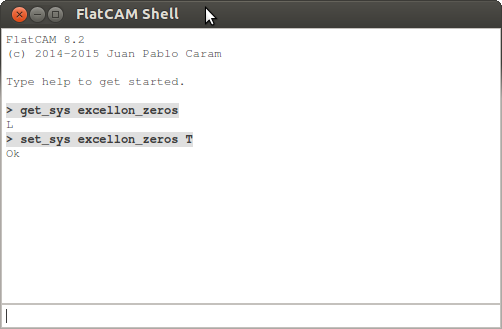
Eagle uses Trailing Zeros in its Excellon number format but does not properly report this format in the Excellon file. To tell FlatCAM to use this format by default set this system option excellon_zeros to T by using the set_sys command in the Shell Command Line Interface as shown below:
Ketikkan set_sys excellon_zeros T pada Cmd Line lalu restart FlatCAM
Panduan cepat untuk mengekspor desain PCB dari Eagle dan mengimpornya ke FlatCAM. Panduan ini dibuat dengan Eagle versi 7.2.0 Light dan FlatCAM 8.2.
Sebagian besar desain dimulai dengan skema rangkaian:
Kemudian dengan meng-klik File→Switch to board, editor papan PCB terbuka dan kemudian menyelesaikan tata letak rangkaian:
Untuk ekspor file cam bor, buka File→CAM Processor lagi dan pilih setelan pada gambar di bawah. Pilih EXCELLON_24 untuk bagian Device. Berikan ekstensi drills.drd pada nama file bor jika perlu. Klik Proses Job untuk mengekspor.
Kita sudah selesai dengan Eagle. Sekarang mari beralih ke FlatCAM.
Eagle menggunakan Trailing Zeros dalam format angka Excellon, format ini perlu dilaporkan dengan benar di FlatCaM dengan cara berikut:
Perubahan pada opsi sistem akan disetel saat memulai ulang, maka FlatCam perlu dijalankan ulang.
Sekarang cukup buka file Gerber dan Excellon yang diekspor dari Eagle.
Cara setting flatmac dapat dilihat di artikel berikut:
This can be done directly from the webinterface. Just go to Plugins -> Plugin Editor -> select the Plugin SyntaxHighlighter Evolved -> add the snippet to the end